Emacs: desktop-save-mode without the automatic restore

Emacs has a built-in way to save and restore sessions: the desktop.el library.
As the Emacs manual says, putting this in the init file enables automatic save and restore of sessions:
(desktop-save-mode 1)But, I wanted a different behavior:
- Automatically save the session
- But don't restore it automatically
I wanted to only use the session feature to restore sessions that I closed by mistake, or where I forgot to finish something before quitting Emacs. By default, I wanted a fresh session every time.
But this also means that some session history has to be maintained; otherwise, a fresh session will start to write to the desktop file and then I will not be able to recover the old session.
By default, the way to do this is to not set desktop-save-mode, but manually call desktop-save when needed, and then call desktop-read when needed. But, if I forget to save, I cannot restore.
This elisp is what I came up with to make it work the way I want:
(defvar my/desktop-snapshot-keep 5
  "How many previous sessions to keep desktop snapshots for.")

(defun my/desktop--snapshots ()
  (nreverse (directory-files desktop-dirname t
                             (concat "\\`" (regexp-quote desktop-base-file-name)
                                     "\\.[0-9]\\{8\\}T[0-9]\\{6\\}\\'"))))

(defun my/desktop--take-snapshot ()
  (let ((live (desktop-full-file-name)))
    (when (file-exists-p live)
      (let ((dest (concat live (format-time-string
                                ".%Y%m%dT%H%M%S"
                                (file-attribute-modification-time
                                 (file-attributes live))))))
        (unless (file-exists-p dest)
          (copy-file live dest t t)))))
  (dolist (old (nthcdr my/desktop-snapshot-keep (my/desktop--snapshots)))
    (delete-file old)))

(defun my/desktop--label (file)
  (format "%s   %d buffers"
          (format-time-string "%Y-%m-%d %H:%M:%S"
                              (file-attribute-modification-time
                               (file-attributes file)))
          (with-temp-buffer
            (insert-file-contents file)
            (how-many "^(desktop-\\(?:create-buffer\\|append-buffer-args\\) "
                      (point-min) (point-max)))))

(add-hook 'emacs-startup-hook
          (lambda ()
            (require 'desktop)
            (setq desktop-dirname (expand-file-name user-emacs-directory))
            (my/desktop--take-snapshot)
            (desktop--get-file-modtime)
            (let ((owner (desktop-owner)))
              (unless (and owner (desktop--emacs-pid-running-p owner))
                (desktop-claim-lock)))
            (desktop-save-mode 1)))

(defun my/desktop-restore (file)
  "Restore the desktop snapshot FILE, prompting for one interactively."
  (interactive
   (progn
     (require 'desktop)
     (let* ((snapshots (or (my/desktop--snapshots)
                           (user-error "No desktop snapshots in %s"
                                       desktop-dirname)))
            (choices (mapcar (lambda (f) (cons (my/desktop--label f) f))
                             snapshots)))
       (list (cdr (assoc (completing-read "Restore desktop session: "
                                          choices nil t)
                         choices))))))
  (desktop-release-lock)
  (let ((desktop-base-file-name (file-name-nondirectory file)))
    (desktop-read (file-name-directory file)))
  (desktop--get-file-modtime))
Note that desktop-save-mode must not be enabled before after-init-hook fires, because that's where desktop.el decides to automatically restore. So, I enable it in emacs-startup-hook, which runs later. Other things inside my emacs-startup-hook lambda are workarounds for how desktop.el works, so they can be fragile if there are major changes to it.
The lock check avoids a stale lock from a crashed Emacs silently disabling auto-save, and naming snapshots after the desktop file's mtime means restarting without saving anything doesn't use up one of the five slots.
Here's what it looks like when I call my/desktop-restore:
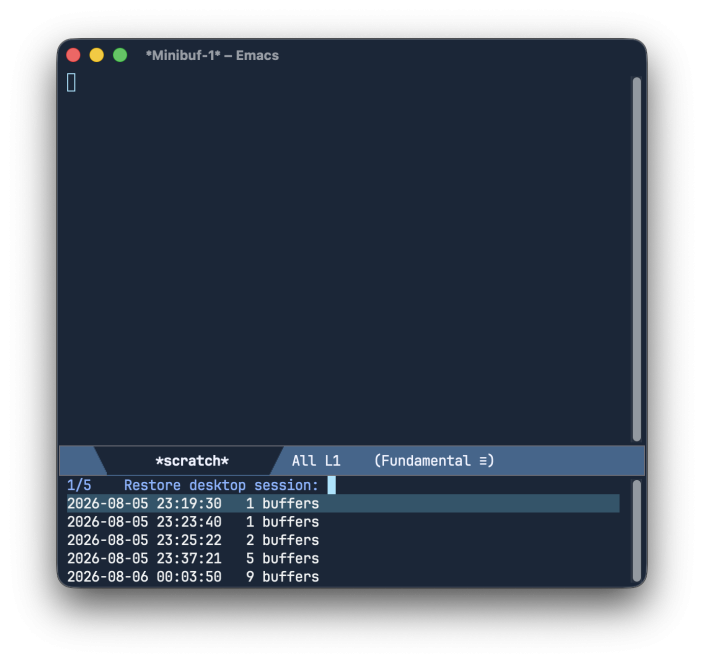
Of course, this can be made better by showing more information per session (like number of projects, names of last edited files or last visited buffers). Vertico/marginalia can show it nicely. Also maybe a section in emacs-dashboard to show recent sessions and click/enter to restore. Something for another day.
Reactions